Screenwriting
A screenplay editor where the AI writes only when you ask
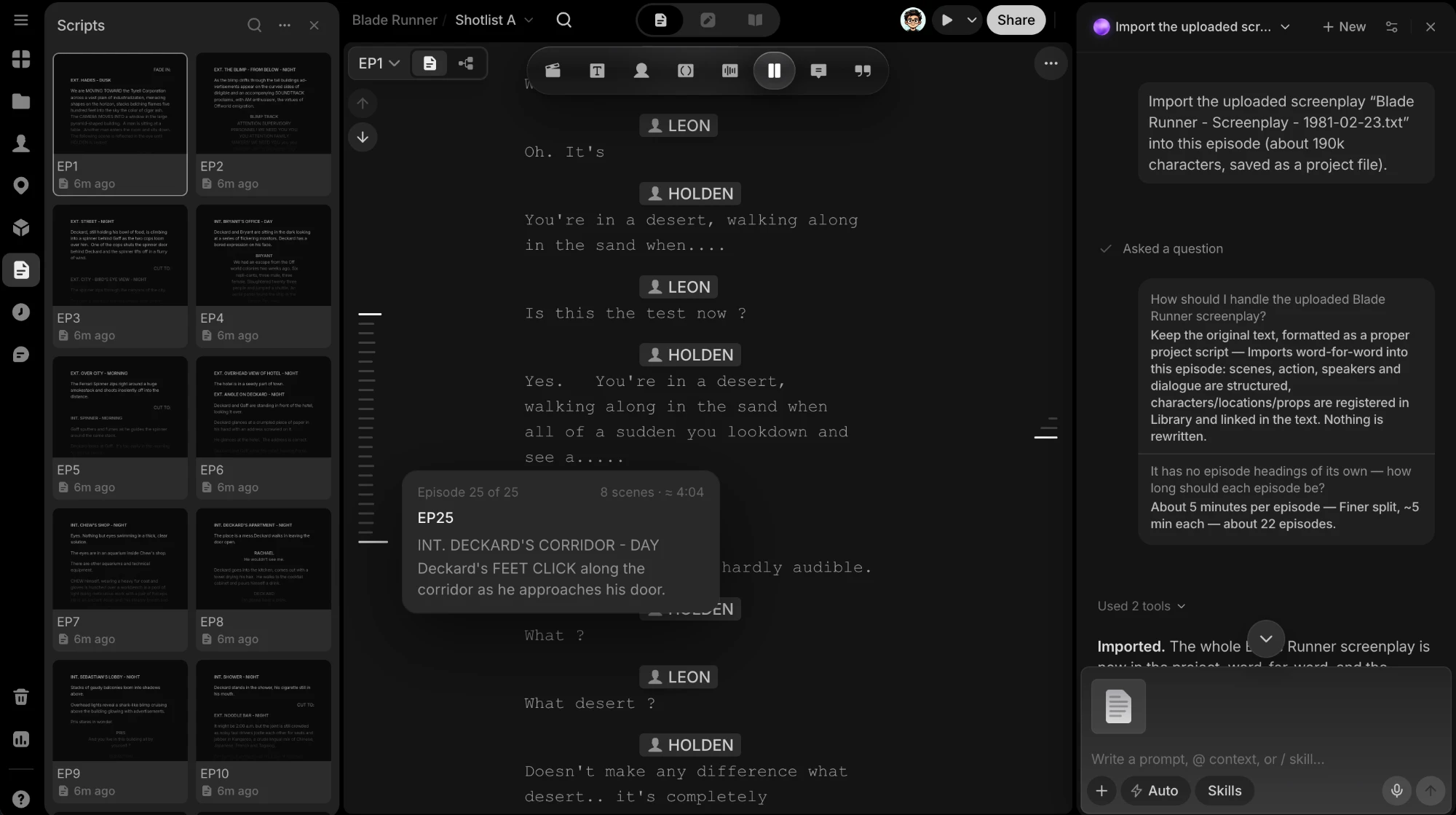
Writing in ClipTap works like a screenwriting app first: scene headings, action, character cues and dialogue, formatted as you type. The AI stays in its own panel. It drafts or rewrites only when you ask it to, and one undo takes back its last write.
When the script is ready, you don't export it anywhere. The same pages become your shot list, storyboard and cut, in the same project.
Your script, your words
AI writes on request, never by itself
All AI writing goes through the ClipTap Agent. Ask it to draft a scene, rewrite a passage or develop the story; nothing else in the editor writes for you.
It won't overwrite what you wrote
The Agent doesn't rewrite an episode you've already written unless you ask for a rewrite.
Undo is one key
Press ⌘Z to take back the Agent's last write, ⌘⇧Z to bring it back.
Not training data
We don't train AI models on your scripts, prompts or uploads, and we don't sell them. See Security.
Industry formatting without thinking about it
A script is a stack of eight block types: Scene, Action, Character, Paren, Dialogue, Transition, Comment and Subtitle. Enter continues with the natural next block, Tab changes the block type, and a slash opens the block picker.
- Two layouts: Hollywood, with indented dialogue, and Asian, flush left, the way Chinese, Korean and Japanese scripts are usually laid out. Switch at any time.
- Scene headings start with a picker for INT., EXT., INT/EXT. or EXT/INT., then a location and an optional time of day.
- Transitions offer CUT TO:, FADE IN:, FADE OUT., FADE TO:, DISSOLVE TO: and BACK TO:.
- Scene rail: one tick per scene on the right; hover for the scene's card and its speaking characters, click to jump.
Bring the script you already have
Upload a .fdx, .fountain, .pdf, .docx, .doc, .rtf, .odt, .epub, .txt or .md file. The text comes in as you wrote it, laid out as proper blocks and checked word for word against the file. A file with episode headings becomes one script per episode. When you're done, export Fountain, Final Draft (.fdx) or a print-ready PDF. More in screenplay import and export.
Plan a series, not just a page
- World Documents hold what must stay true across episodes: logline, theme, antagonist, beat sheet, world rules, red lines and open questions. The Agent reads them before it writes.
- An Outline per episode, written however you like, with @ references to people, places, props and scenes.
- A Library of characters, locations and props. Type @ in the script to reference one; names the script uses but the Library doesn't know yet are flagged so you can add them.
- Write together. Everyone on the project edits the same script live, each with their own caret.
Then shoot the same script
This is where ClipTap differs from a screenwriting app. Ask the Agent to break scene 3 into shots or board out a sequence, and it works from the script you have open. Shots, references and takes stay tied to the scene they came from, and the finished cut goes to Final Cut Pro or DaVinci Resolve as an FCPXML project.
Questions writers ask
Yes. Every workspace is free, with no subscription and no card: writing, importing, exporting and real-time collaboration included. AI runs use credits you buy when you need them, and bought credits never expire. See pricing.
Yes. The editor, formatting, import and export work on their own. The Agent only acts when you send it a message.
Yes. Export Final Draft (.fdx), Fountain (.fountain) or a PDF at any time.
Yes. The Asian layout is flush left, and print and PDF follow CJK line breaking when the script is mostly CJK text.














Open a blank page, or bring the script you have.
Start free. Credits never expire, and you pay only for what you generate