Story Outline
Plan the whole story in one table, the premise, rules, each episode's plan, threads to pay off and states that hold, read by the Agent before it writes.
The Story Outline holds what has to stay true across your episodes: what the story is, the rules it keeps, what each episode is for, the setups that must pay off, and the facts that hold for a while. It's one outline for the whole project. Open it from the Script tab: switch the top-left pill from Script to Story Outline.
The ClipTap Agent reads the entries that apply to an episode before it writes that episode, and it records what an episode settled as new entries. You can write and change every entry yourself too.
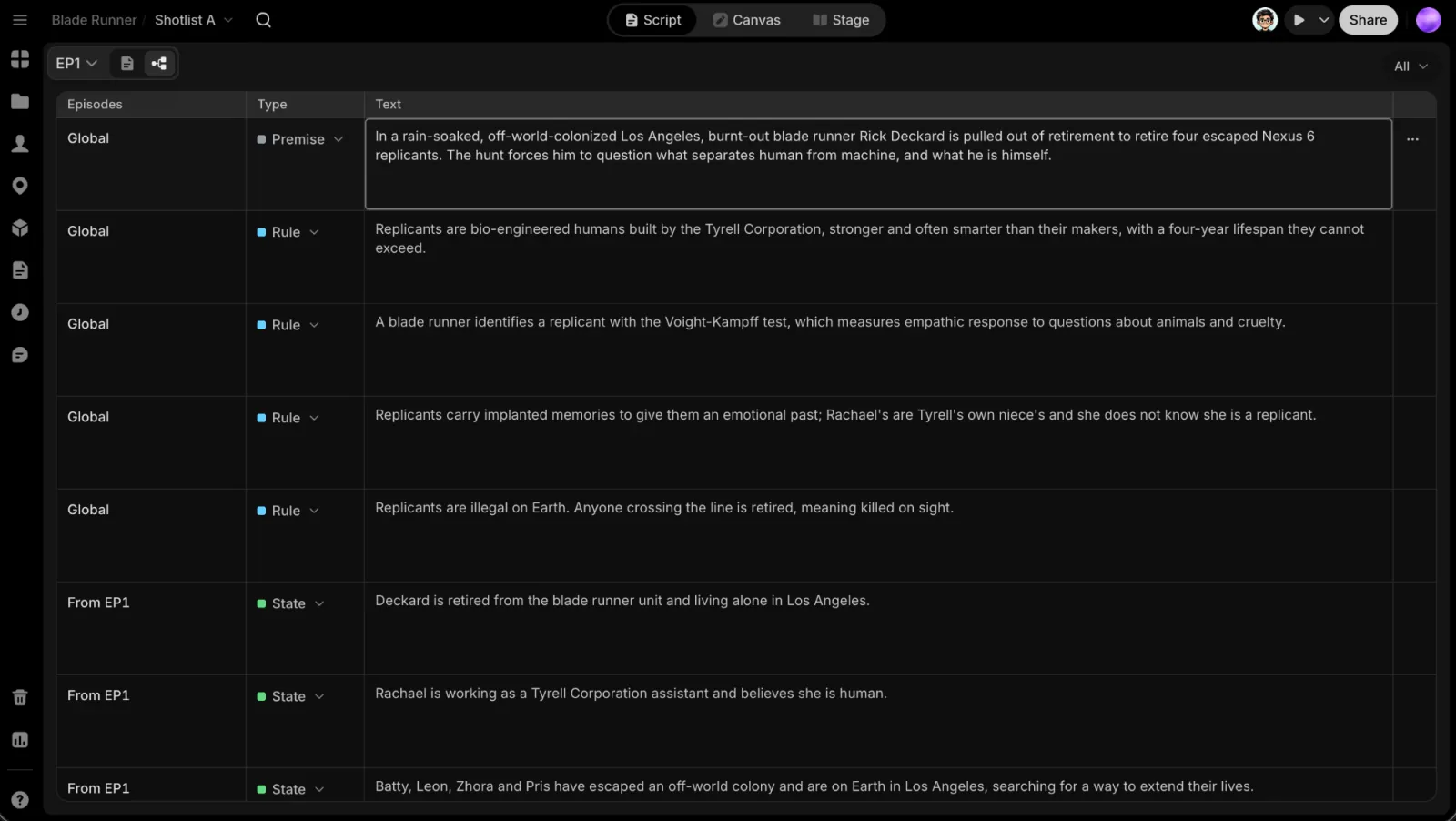
Entries and their types
The outline is one table. Each row is an entry with three columns: Episodes, Type and Text. Every entry has a type, shown as a coloured dot:
| Type | What it holds |
|---|---|
| Premise | The story in one line, the synopsis, or where an arc goes |
| Rule | Something every episode must keep, or must not do |
| Plan | What happens in an episode, its hook, its cliffhanger |
| Thread | Something set up that has to pay off later |
| State | What is true from an episode on: who knows what, who holds what |
Rows run in the order their episodes start, the global ones first. The type filter at the top right (All by default) shows only the types you tick; pick as many as you like.
Which episodes an entry holds for
The Episodes cell says where an entry applies: Global (read with every episode), EP3, EP1–6, or From EP4. A Thread reads as Set up EP1 · due EP4, or Set up EP1 · paid EP3 once it pays off.
Click the cell to change it:
- Holds for: Every episode or Some episodes.
- With some episodes, click the grid for From, then To. Click the same episode again, or No end, to keep it holding from then on. Reset puts back what it was.
- A Thread has Set up, Due and Paid off instead.
The change is written when the picker closes. Under the cell, a row is flagged when a Thread is Overdue, or when an episode it depends on was rewritten (EP3 changed · may be out of date). These are the same flags the Agent sees.
Write and edit entries
- Add an entry: hover the line between two rows and click Add, then pick its type. The new entry takes the episodes of the row above and opens for typing, so it lands where you asked. The Add under the last row adds at the end. With the table filtered to one type, it adds that type straight away (Add Rule).
- Edit the text: click it and type.
- Change the type with the type pill in its row. A State that changes across episodes stays a State.
- Entry actions (the row's ⋯):
- Paid off in EP3 (named after your latest written episode) marks an open Thread as paid off there.
- Changes from EP3 (on a State) records that it changes from that episode: what it said before still holds for earlier episodes, and you write what is true from then on. Drop the change from EP3 takes it back out.
- Duplicate and Delete… (deleting asks first; the Agent no longer reads the entry).
Undo your own changes with ⌘Z and ⌘⇧Z, or the toast's Undo. Typed text undoes like any text field. An entry someone else changed since is left alone.
Working together
Everyone on the project sees edits as they happen. Other people in the outline show as faces at the top right, and as a ring with their name on the row they are in.
When the Agent works on the outline, its orb appears at the top right with what it is doing, and the rows it is working on are ringed in its colour. A row it just changed glows with a check for a moment.
If your project had an outline from before the Story Outline, it turns into entries the first time you open the page.
You don't have to fill in the outline by hand. Ask the Agent to plan the season, or to note what an episode set up; it writes entries you can then edit.
Next
Write the episodes in Scripts, or manage the characters, locations and props the story uses in the Library.